 BuildWell
BuildWell vs SimplyWise
Both are AI estimating apps for contractors: you show the AI the job and it drafts the estimate. SimplyWise’s store listings describe an estimate built from a jobsite photo, with upsell suggestions, renderings and receipt tracking in the app; BuildWell plans the work with AI while every price comes from local store and wage data.
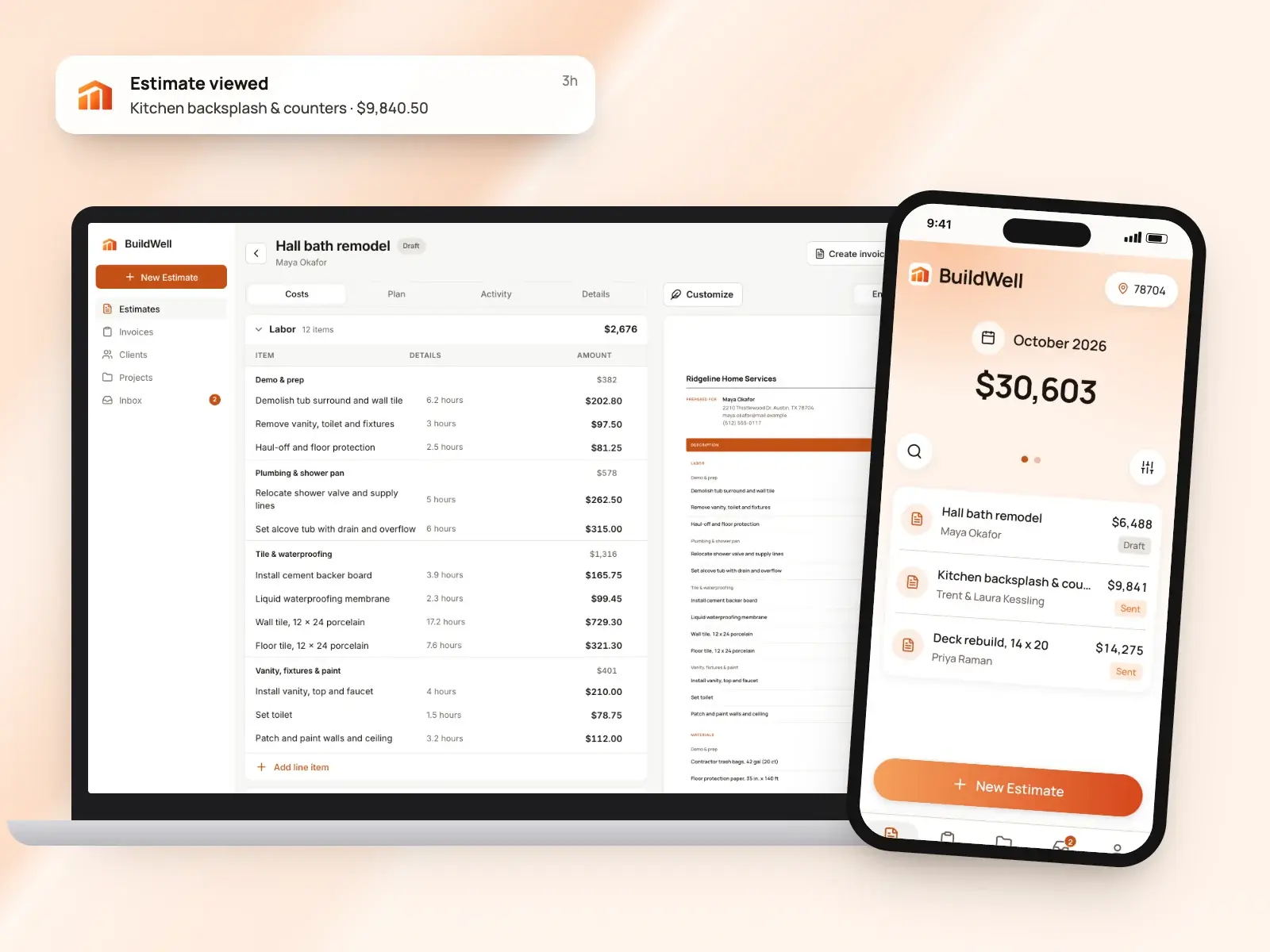
BuildWell and SimplyWise at a glance
| Feature | BuildWell | SimplyWise | Source |
|---|---|---|---|
| Price | $7.99 a week or $79.99 a year, one plan with everything | Free to download, with in-app purchases, per its App Store listing | [1][2] |
| Free plan or trial | 3-day free trial; no free plan | — | [1] |
| Platforms | iPhone, Android and web, one subscription for all three | iPhone and iPad on the App Store, and Android on Google Play | [3][2][4] |
| How you start an estimate | Describe the job by voice or text, with up to five photos or a floor plan | Take a photo and describe the project in plain language, per its Google Play listing | [5][4] |
| How estimate prices are set | AI picks the work and quantities; materials at stores near the job (checked within 30 days), labor at the local BLS median wage plus your overhead and markup | Its listings say the AI breaks the job into material and labor costs, and your profit margin and overhead are applied to every estimate | [5][2][4] |
| AI | AI estimates from voice, text, photos or a floor plan; AI before-and-after renders | Estimates from a photo, AI that flags missing details, upsell suggestions and before-and-after renderings, per its store listings | [5][6][2][4] |
| Room scan | LiDAR room scan on iPhones that have it | 3D room scanning with the phone’s LiDAR, per its App Store listing | [3][2] |
| Client e-signatures | Clients sign estimates on their phone; you see when they open them | — | [7] |
| Invoices | A signed estimate becomes the invoice, with deposits and progress payments | Bill clients from the app once the job is done, per its App Store listing | [8][2] |
| Online payment fees (US) | Card 2.9% + 30¢; bank 0.8%, capped at $5 (Stripe’s fee at cost, no BuildWell fee) | Payments through Stripe Connect; its terms say Stripe’s fees show in your Stripe dashboard | [9][10] |
| Receipts and expenses | Not offered | Receipt scanning and expense tracking in the app, per its Google Play listing | [1][4] |
| App languages | English or Spanish | English, per its App Store listing | [3][2] |
From each company’s own site as of October 4, 2026. A dash means it isn’t listed there.
What each app is
What is SimplyWise?
SimplyWise’s home page describes AI tools for contractors and small business owners: a cost estimator, a receipt scanner and a mileage tracker, and its terms also name an AI receptionist app. According to its App Store listing, SimplyWise Cost Estimator turns jobsite photos into estimates broken down into material and labor costs, suggests upsells, and shows clients AI renderings of the finished renovation. The listing names general contractors, roofers, remodelers, painters, flooring specialists and plumbers, and its Google Play listing adds homeowners planning a project. [11][10][2][4]
What is BuildWell?
BuildWell is an estimating and invoicing app for contractors doing remodels, repairs and the common trades, on iPhone, Android and the web. You describe a job by voice, text, photos or a floor plan; the AI plans the work and quantities, and every price comes from data: materials at stores near the job, checked within 30 days, and labor at the Bureau of Labor Statistics median wage for each trade in your metro, plus your overhead and markup. Clients sign on their phone, the estimate becomes the invoice, and clients pay by card or bank transfer at Stripe’s cost. It’s one plan at $7.99 a week or $79.99 a year after a 3-day free trial, and it doesn’t do scheduling, dispatch, CRM, payroll, time tracking, GPS or accounting. [12][5][7][8][9][1]
Feature by feature
Writing the estimate
SimplyWise: SimplyWise’s Google Play listing lays out the steps: take a photo, describe the project in plain language, such as replacing kitchen tiles, and get a full estimate with labor and material costs listed separately. The listing says the AI flags missing details and improves line items before you share it, and that you can review and edit the estimate. Its App Store listing adds folders by room, job type or client. [4][2]
BuildWell: You describe the job by voice or text, add up to five photos or a floor plan, and BuildWell asks only the questions that change the price. It shows the plan of work in order first, then builds line items, each a unit of work with its own labor hours and materials. Every quantity, hour and price is editable, and a revision keeps the original and gets signed again. [5][12]
The difference: Both start from what you show the AI. SimplyWise’s listings describe a photo and a short description as the starting point; BuildWell asks follow-up questions and shows its plan of work before it prices the job. [4][5]
How prices are set
SimplyWise: According to its App Store listing, SimplyWise’s AI breaks every project into material and labor costs, and built-in markups apply your profit margin and overhead to every estimate. Its Google Play listing describes labor and material costs priced line by line and kept separate on the finished estimate. [2][4]
BuildWell: Prices come from real local data. Each material is priced at a store near the job, checked within the last 30 days, and labor is the Bureau of Labor Statistics median wage for that trade in your metro, plus the overhead, markups, sales tax and permit fee you set. If a material has no store price, the estimate flags it and you confirm it before sending. Prices you type in are saved. [5][12]
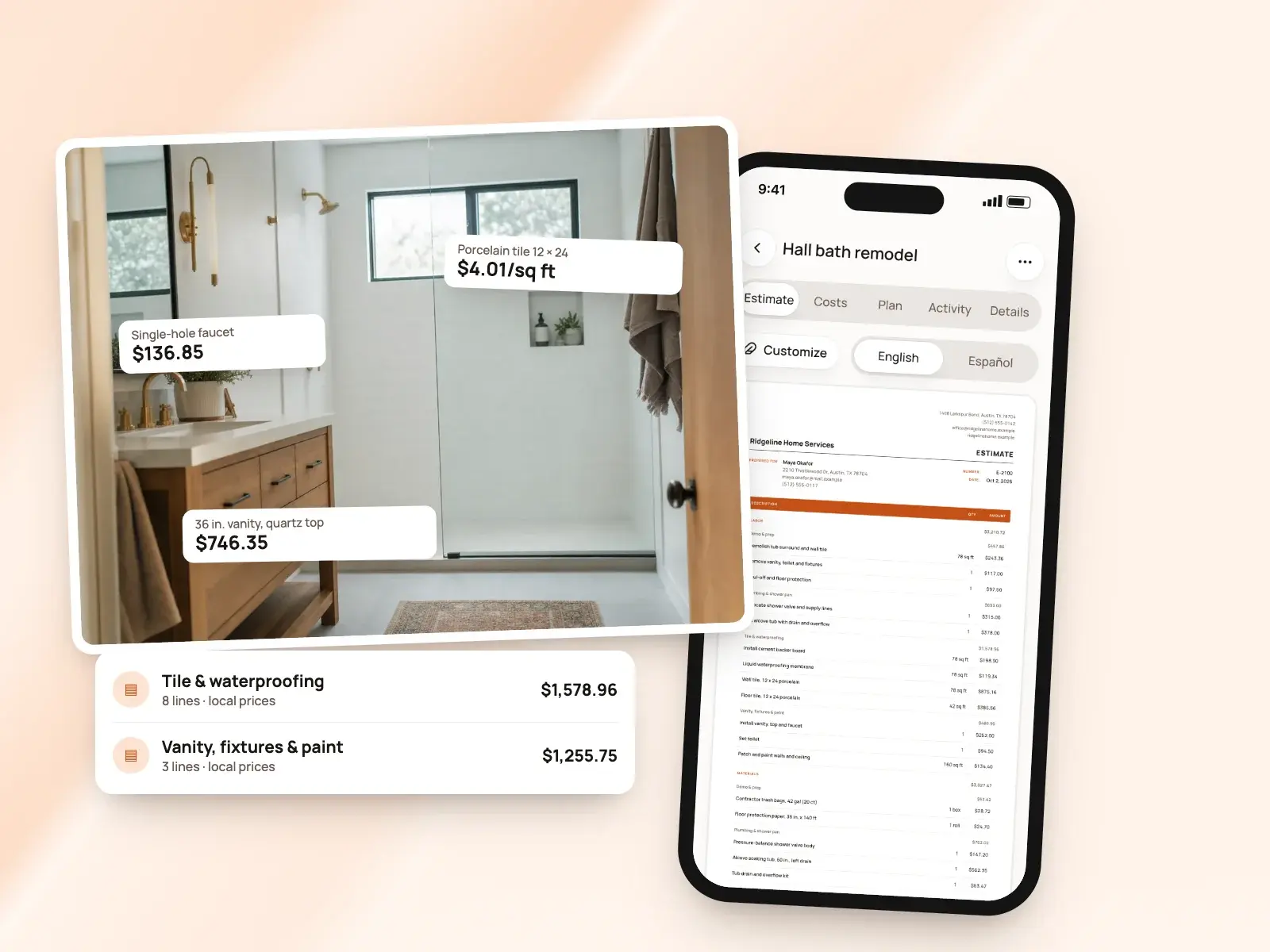
The difference: Both apply your markup and overhead on top. BuildWell prices materials from stores near the job and labor from BLS wages, and flags any material without a store price. [2][5]
AI tools
SimplyWise: SimplyWise’s App Store listing describes AI that suggests upgrades and add-ons to raise the value of a job, and before-and-after renderings that show a client what the renovation will look like. Its terms describe what the AI produces as information, not professional advice. [2][10]
BuildWell: AI does the estimating: it reads your words, photos and floor plan, plans the work and picks quantities, and you can ask it to revise the estimate after your own edits without losing them. It also makes before-and-after renders of the finished room from a photo. BuildWell shares job details and photos with Anthropic, Google and OpenAI to do this, which you can turn off in your profile. [5][6]
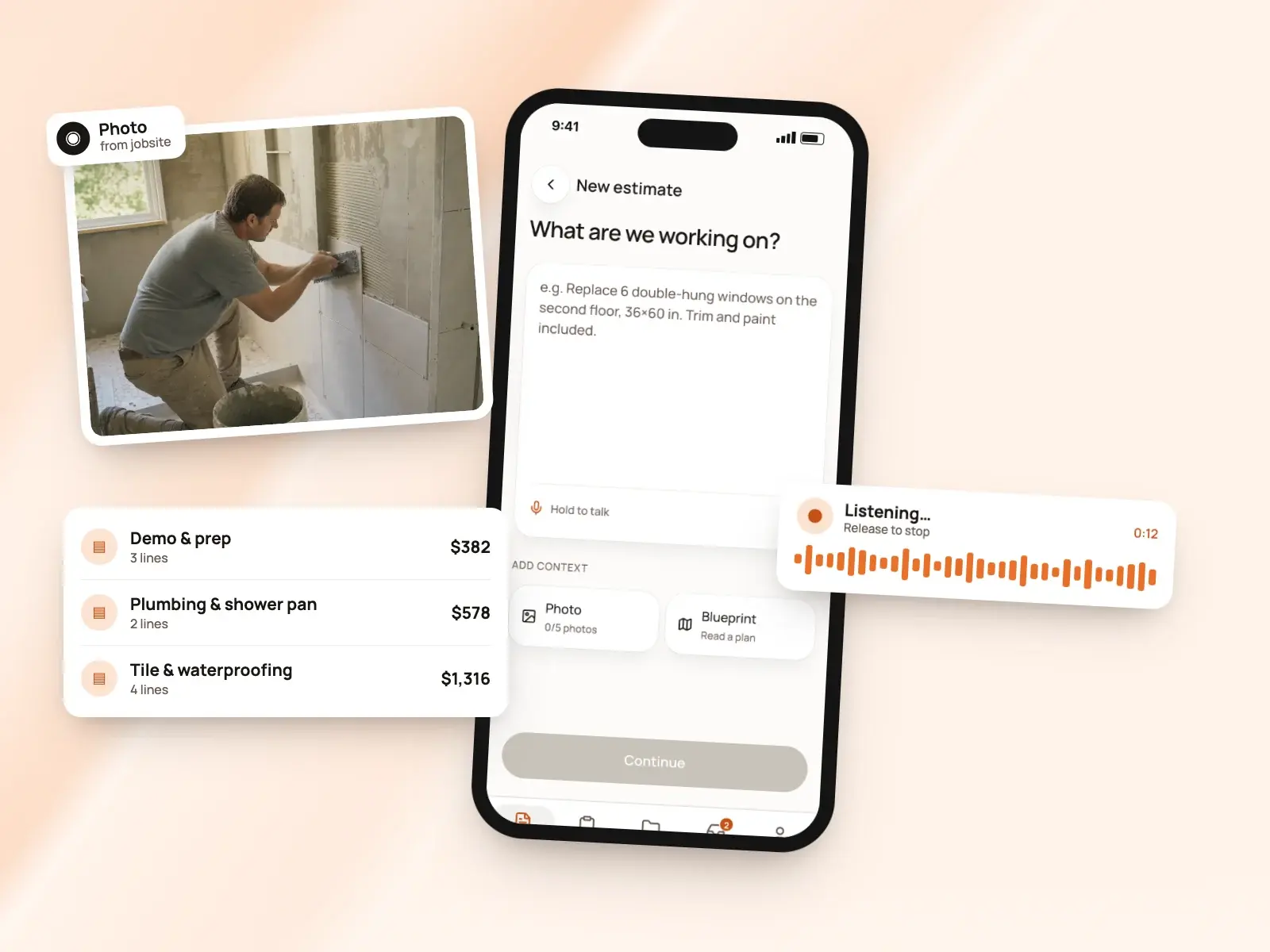
The difference: Both make before-and-after renders for clients. SimplyWise’s listing adds upsell suggestions; BuildWell’s AI can revise the estimate after your own edits and keep them. [2][5]
Measuring the room
SimplyWise: SimplyWise’s App Store listing describes 3D room scanning that uses the phone’s LiDAR sensor to capture room measurements, alongside the photo the estimate starts from. [2]
BuildWell: On iPhones with LiDAR you can scan a room for its measurements, and the AI reads the measurements on a floor plan you upload. Up to five photos go with each description, and the AI reads them as part of the job. [3][5]
Sending the estimate and client approval
SimplyWise: SimplyWise’s App Store listing describes generating branded estimates and sending them as PDFs, and its Google Play listing says you share the final quote as a PDF so clients can review and approve it faster. [2][4]
BuildWell: Clients open the estimate on their phone, with no app or account, and accept and sign with a finger or decline. Their name and signature print on the signed estimate. You can send the link by text or email, copy it anywhere, share the PDF, or collect the signature in person on your own phone. [7]
Invoices and job tracking
SimplyWise: According to its App Store listing, SimplyWise lets you bill clients directly from the app once the job is done, and its work order management tracks each project from estimate to completion. [2]
BuildWell: A signed estimate becomes the invoice with the same lines, or you start one from scratch for a small job. Invoice any percentage as a deposit, then progress payments and the balance, each recorded against its invoice. Terms are due on receipt, 7, 14 or 30 days, and you can record cash and check payments or void an unpaid invoice. [8]
Online payments and fees
SimplyWise: SimplyWise’s terms describe invoicing and receiving payments from your customers as an optional feature, processed by Stripe Connect after you agree to Stripe’s connected account terms. The terms say Stripe may charge fees, shown in your Stripe dashboard, and that you handle disputes and chargebacks with your customers. [10]
BuildWell: Connect Stripe once and clients choose card or US bank account on the invoice page. Stripe’s fee is passed through at cost, 2.9% + 30¢ for a card and 0.8% capped at $5 for a bank transfer, with no BuildWell fee. You can also list Zelle, Venmo, Cash App, PayPal or check details to print on every invoice. [9]
The difference: Both take client payments through Stripe. BuildWell states its card and bank rates on its payments page; SimplyWise’s terms point you to your Stripe dashboard for fees. [10][9]
Receipts, expenses and mileage
SimplyWise: SimplyWise’s Google Play listing says the Cost Estimator also includes receipt scanning and expense tracking, to keep a project’s costs organized. Its home page describes separate SimplyWise apps for receipts, with emailed receipts imported and expense reports, and for mileage, with drives logged automatically for tax-ready mileage reports. [4][11]
BuildWell: BuildWell doesn’t scan receipts, track expenses or log mileage. Projects hold a job’s estimates, invoices, photos and renders, and it doesn’t do scheduling, dispatch, CRM, payroll, time tracking, GPS or accounting. [6][1]
The difference: SimplyWise’s listing puts estimates and job expenses in one app. BuildWell covers estimates, signatures, invoices and payments. [4][1]
Branding and language
SimplyWise: According to its App Store listing, SimplyWise sends branded estimates as PDFs and applies your markups to every estimate. The listing gives English as the app’s language. [2]
BuildWell: Six document templates carry your logo and colors, on the one plan. Any estimate or invoice prints in English or Spanish, signed estimates print the client’s name and signature, and you can export an estimate as CSV. [1][3][7][12]
Devices and support
SimplyWise: SimplyWise Cost Estimator is on the App Store for iPhone and iPad, where the listing also names Apple silicon Macs, and on Google Play for Android. Its support page offers a contact form answered by a US-based team, Monday to Friday from 9am to 6pm Eastern, and links to its FAQs. [2][4][13]
BuildWell: One subscription, bought on the App Store, Google Play or the web, covers BuildWell on iPhone, Android and the web, in sync. The app works in English or Spanish, and support is by email. It doesn’t do scheduling, dispatch, CRM or accounting, or sync with QuickBooks. [3][14][1]
Pricing compared
| Plan | Price | What it includes |
|---|---|---|
| SimplyWise Cost Estimator | Free to download, with in-app purchases | Per its App Store listing; check the app for current plan prices [2] |
| BuildWell Weekly | $7.99 a week | Every feature, on iPhone, Android and web [1] |
| BuildWell Annual | $79.99 a year | The same features, paid yearly [1] |
SimplyWise Cost Estimator is free to download with in-app purchases, according to its App Store listing. SimplyWise’s terms describe subscriptions that renew monthly or yearly until you cancel, and free trials that turn into a paid subscription unless you cancel before the trial ends. BuildWell is one plan with every feature, $7.99 a week or $79.99 a year, after a 3-day free trial. [2][10][1]
Payment processing is charged on top in both apps. BuildWell passes Stripe’s 2.9% + 30¢ for a card through at cost and adds nothing; SimplyWise’s terms say Stripe’s fees show in your Stripe dashboard. [9][10]
The verdict
Both are AI estimating apps for contractors that turn what you show them into an estimate you can send and bill from, with client payments through Stripe. SimplyWise’s listings put receipt scanning and expense tracking in the same app; BuildWell is built around pricing each line from local store and wage data. [2][4][10][5][9]
Choose SimplyWise if…
Choose SimplyWise if you want to start an estimate from a jobsite photo and a short description, like AI upsell suggestions and before-and-after renderings to show clients, want a LiDAR room scan, and want receipt scanning and expense tracking in the same app, in English. [4][2]
Choose BuildWell if…
Choose BuildWell if you want to see where each price comes from: work and quantities planned by AI, materials at stores near the job and labor at local wages, then signed on the client’s phone, invoiced in stages and paid at Stripe’s cost. It works in English or Spanish at $7.99 a week or $79.99 a year, and it doesn’t track receipts, expenses or mileage. [5][12][7][8][9][3][1]
Estimates priced for your ZIP
Describe the job. BuildWell lists the work, prices it from local store prices and your area’s wages, gets it signed and turns it into the invoice.
- AI estimates priced for your area
- Estimates, invoices, clients and projects
- Clients sign on any phone
- Card and bank payments, no extra BuildWell fee
- iPhone, Android and the web
- AI estimates priced for your area
- Estimates, invoices, clients and projects
- Clients sign on any phone
- Card and bank payments, no extra BuildWell fee
- iPhone, Android and the web
Both plans include every feature and start with a 3-day free trial. Add a card to start; you’re not charged until the trial ends. Cancel anytime.
Common questions
01How do BuildWell and SimplyWise prices compare?
02Do both make AI estimates from photos?
03Where do the prices on each app’s estimates come from?
04Can I scan a room in both?
05How do client payments work in each?
Sources
Facts checked on October 4, 2026. Prices and plans change; check each company’s site before you buy.
- BuildWell pricing (checked 2026-10-04)
- SimplyWise Cost Estimator on the App Store (checked 2026-10-04)
- BuildWell estimate app (checked 2026-10-04)
- SimplyWise Cost Estimator on Google Play (checked 2026-10-04)
- BuildWell AI estimates (checked 2026-10-04)
- BuildWell job photos and renders (checked 2026-10-04)
- BuildWell client portal (checked 2026-10-04)
- BuildWell invoicing (checked 2026-10-04)
- BuildWell online payments (checked 2026-10-04)
- SimplyWise terms of use (checked 2026-10-04)
- SimplyWise home page (checked 2026-10-04)
- BuildWell estimating software (checked 2026-10-04)
- SimplyWise support (checked 2026-10-04)
- BuildWell support (checked 2026-10-04)
More comparisons

Try BuildWell today
Estimates, invoices, e-signatures and payments in one place, on your phone and on the web.