 BuildWell
BuildWell vs Jobber
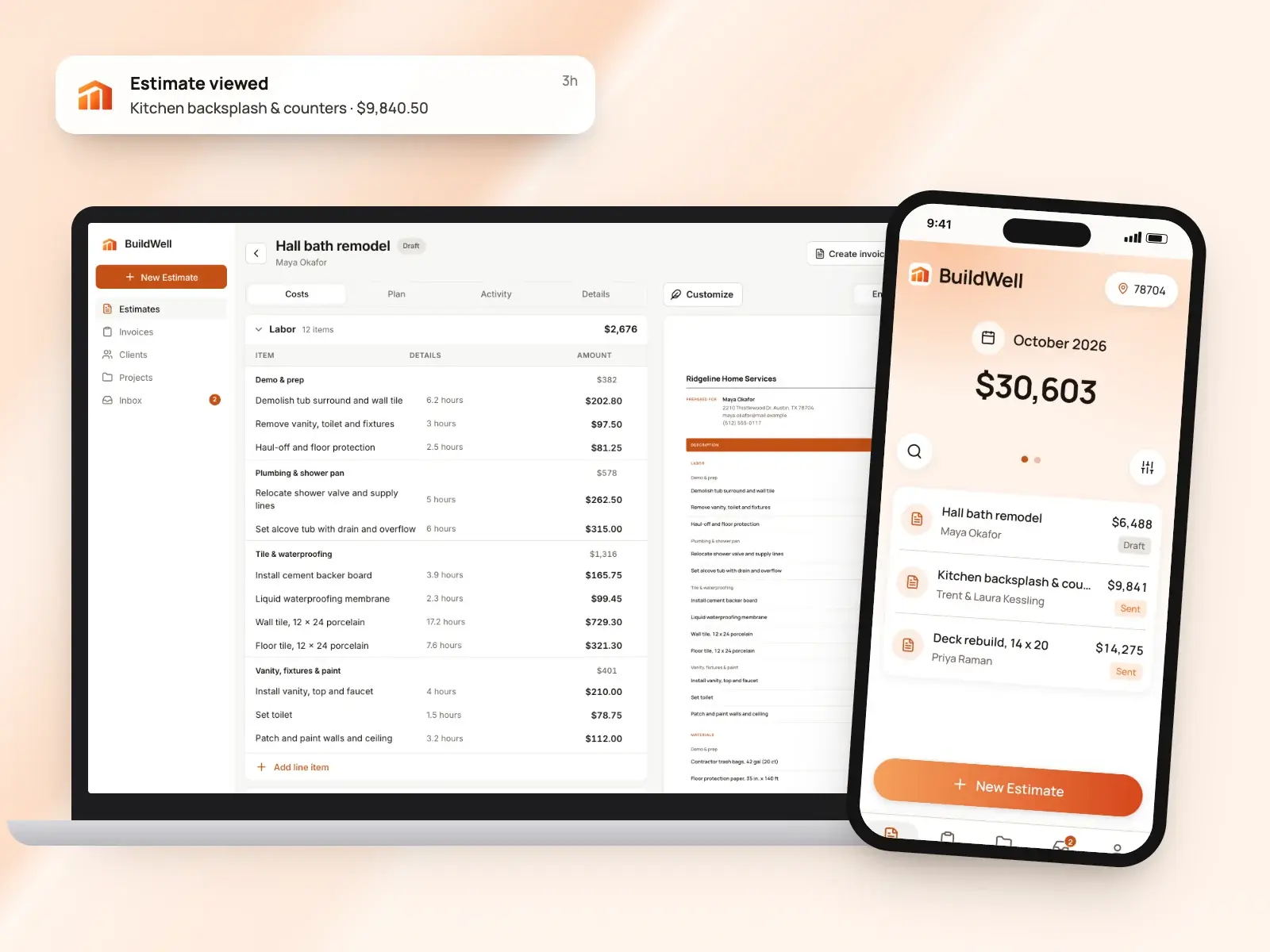
Jobber is field service software that runs scheduling, crews, quotes, invoices and payments for home-service businesses. BuildWell does one part of that, estimating and billing, and prices each estimate from local store and wage data.
BuildWell and Jobber at a glance
| Feature | BuildWell | Jobber | Source |
|---|---|---|---|
| Price | $7.99 a week or $79.99 a year, one plan with everything | Four plans. With no commitment: Core $49, Connect $139 and Grow $199 a month for one user each, and Plus $499 a month for five users; less on a one-year commitment or billed annually. Extra users $29 a month each | [1][2] |
| Free plan or trial | 3-day free trial; no free plan | 14-day trial of the Grow plan, no credit card needed | [1][2] |
| Platforms | iPhone, Android and web, one subscription for all three | iOS and Android apps and the web | [3][2][4] |
| Who it’s built for | Contractors doing remodels, repairs and the common trades | Home-service businesses; Jobber cites more than 50 industries | [5][6] |
| How quote prices are set | AI picks the work and quantities; materials at stores near the job (checked within 30 days), labor at the local BLS median wage plus your overhead and markup | You price from your products and services list; you can also search a national home-improvement retailer’s catalog inside the quote | [7][8][9] |
| AI | AI estimates from voice, text, photos or a floor plan; AI before-and-after renders | Jobber AI (beta) on every plan: by voice in the mobile app it creates quotes, sends invoices and checks the schedule; by chat it answers questions about your business data | [7][10][11] |
| Client approval and e-signature | Clients sign estimates on their phone; you see when they open them | Clients approve quotes in Jobber’s client hub and can draw or type a signature; a required deposit can be paid at approval | [12][13][9] |
| Deposits and progress billing | Invoice any percentage as a deposit, then progress payments and the balance | Deposits and payment schedules by percentage or fixed amount, on every plan | [14][15] |
| Card payment fee | 2.9% + 30¢ (Stripe’s fee at cost, no BuildWell fee) | 2.9% + 30¢; Tap to Pay in person 2.7% + 30¢ | [16][2] |
| Bank (ACH) payment fee | 0.8%, capped at $5 (Stripe’s fee at cost, no BuildWell fee) | 1% (US) | [16][2] |
| Scheduling and time tracking | Not offered | Drag-and-drop scheduling and online booking on every plan; routing, GPS tracking and time tracking from the Connect plan up | [1][6][2] |
| Accounting sync | Not offered | QuickBooks Online and Xero sync from the Connect plan up | [1][2] |
From each company’s own site as of October 4, 2026. A dash means it isn’t listed there.
What each app is
What is Jobber?
Jobber is field service software for home-service businesses, which it says span more than 50 industries, with iOS and Android apps and a web version. It covers the whole job: online booking and requests, a client manager, scheduling, quotes, invoices and payments, with a client hub where customers approve quotes and pay. Its pricing page lists routing, time tracking and QuickBooks Online and Xero sync from Connect, job costing from Grow, and custom reports, a sales pipeline and marketing tools on Plus. There are four plans priced by team size, with a 14-day trial, and Jobber’s help center says Jobber Payments processes payments in the US, Canada and the UK. [6][2][4][17]
What is BuildWell?
BuildWell is an estimating and invoicing app for contractors doing remodels, repairs and the common trades, on iPhone, Android and the web. You describe a job by voice, text, photos or a floor plan; the AI plans the work and quantities, and every price comes from data: materials at stores near the job, checked within 30 days, and labor at the Bureau of Labor Statistics median wage for each trade in your metro, plus your overhead and markup. Clients sign on their phone, the estimate becomes the invoice, and clients pay by card or bank transfer at Stripe’s cost. It’s one plan at $7.99 a week or $79.99 a year after a 3-day free trial, and it doesn’t do scheduling, dispatch, CRM, payroll, time tracking, GPS or accounting. [5][7][12][14][16][1]
Feature by feature
Writing the quote
Jobber: You add line items from your saved products and services, each with a name, description and unit price, or type new ones. Reusable templates cover common jobs. Jobber’s pricing page lists richer quotes with images and reviews, and optional line items the client can add, on Grow and Plus. Jobber says an approved quote converts into a job in one click, carrying its line items and pricing over. [8][9][2]
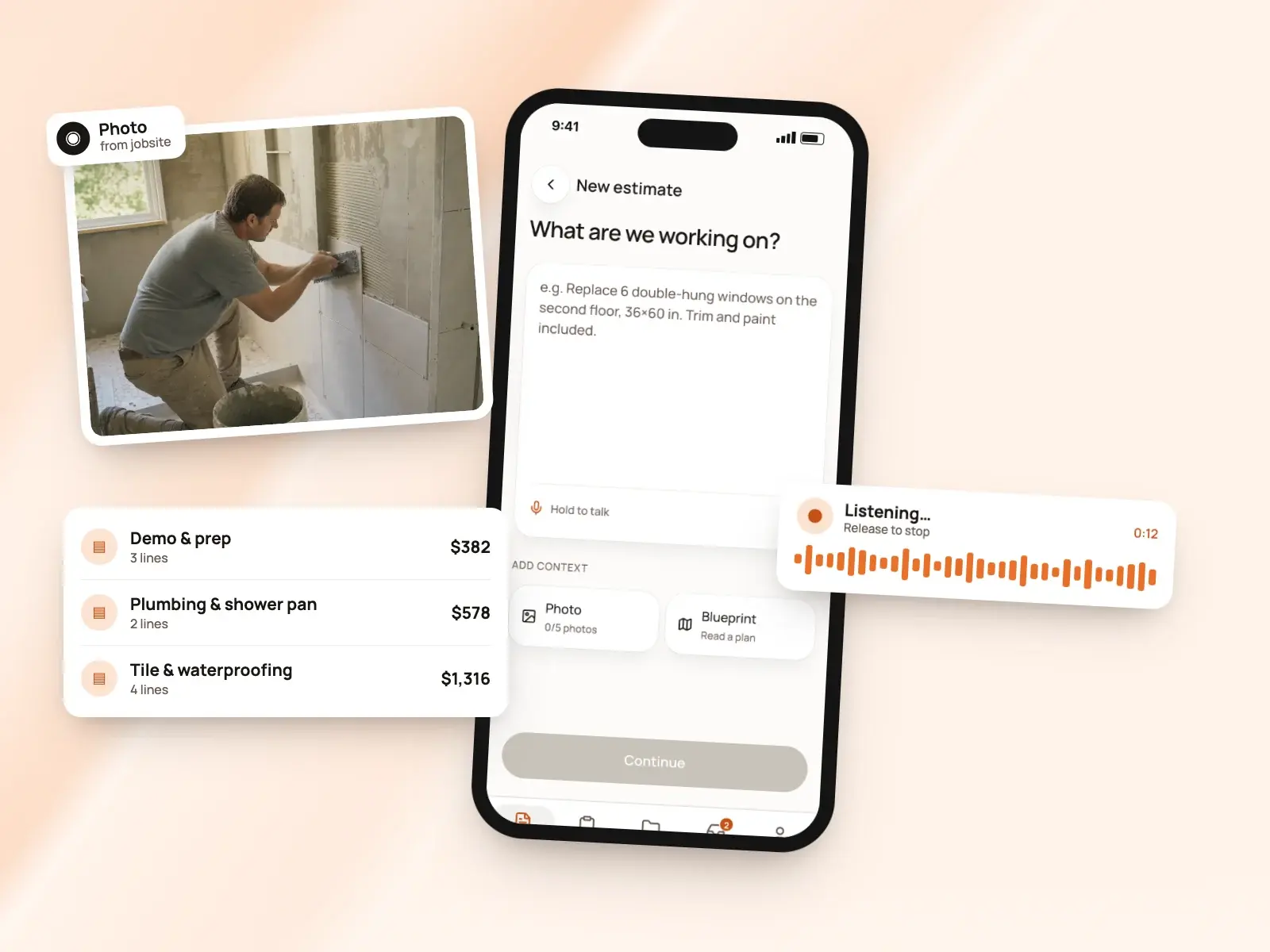
BuildWell: You describe the job by voice or text, add up to five photos or a floor plan, and BuildWell asks only the questions that change the price. It shows the plan of work in order first, then builds line items, each with its own labor hours and materials. Every line is editable, and a revision keeps the original and is signed again. [7][5]
The difference: Jobber quotes start from a saved list of the services you sell. BuildWell starts from a description of the job and plans the scope and quantities for you to review. [8][7]
Where the prices come from
Jobber: Prices come from you. Jobber’s help center says the products and services list stores unit price, and on select plans unit cost and markup, and it can be imported or updated in bulk from a CSV file. Inside a quote you can also search a national home-improvement retailer’s catalog for current prices and stock. [8][9]
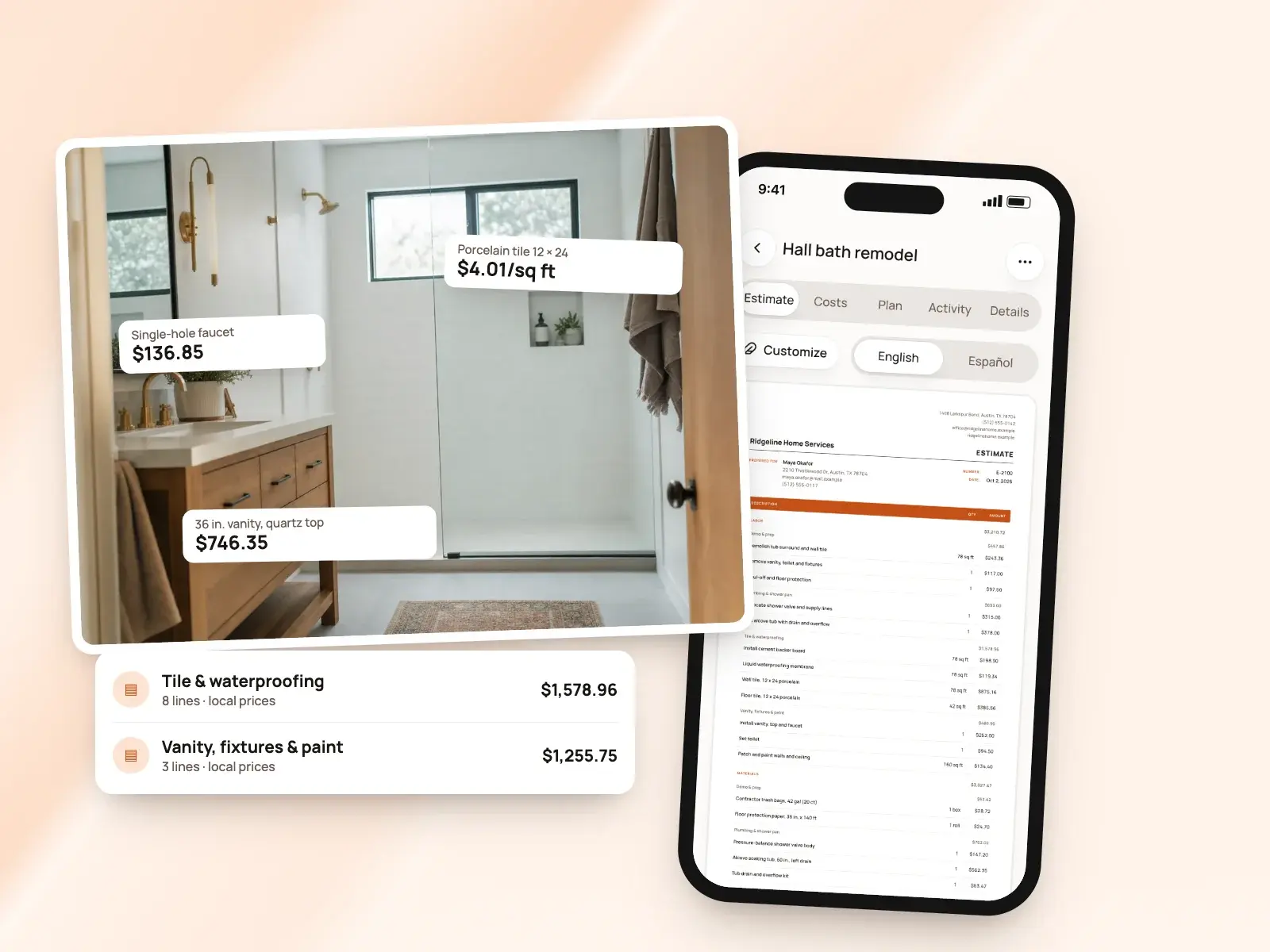
BuildWell: Prices come from real local data. Each material is priced at a store near the job, checked within the last 30 days, and labor is the Bureau of Labor Statistics median wage for that trade in your metro, plus the overhead, markups, sales tax and permit fee you set. A material with no store price is flagged for you to confirm before sending, and prices you type are saved. [7][5]
AI tools
Jobber: Jobber AI is in beta, and Jobber’s help center says it’s on all plans. Chat works on the web and in the mobile app; Voice, in the mobile app, can create quotes, send invoices, check the schedule and capture details in the field. It answers questions about your clients, quotes, jobs, invoices and employees, and offers business coaching, marketing content and product help. Admin users get the full set; other team members get product help. [11]
BuildWell: AI does the estimating: it reads your words, photos and floor plan, plans the work and picks quantities, and you can ask it to revise the estimate after your edits without losing them. It also renders the finished room from a photo. BuildWell shares job details and photos with Anthropic, Google and OpenAI to do this, which you can turn off in your profile. [7][10]
The difference: Jobber describes its AI as an assistant for tasks and questions across the business. BuildWell’s AI plans the estimate itself, with prices from store and wage data rather than from the model. [11][7]
Client approval and e-signatures
Jobber: Jobber’s help center says clients get a link by email or text and open the quote in its client hub, where they approve, request changes if you allow it, and draw or type their name. Signatures are optional unless you turn on the setting that requires them. Admin users get an activity-feed and push notification on approval, and the next step is converting the quote to a job. [13]
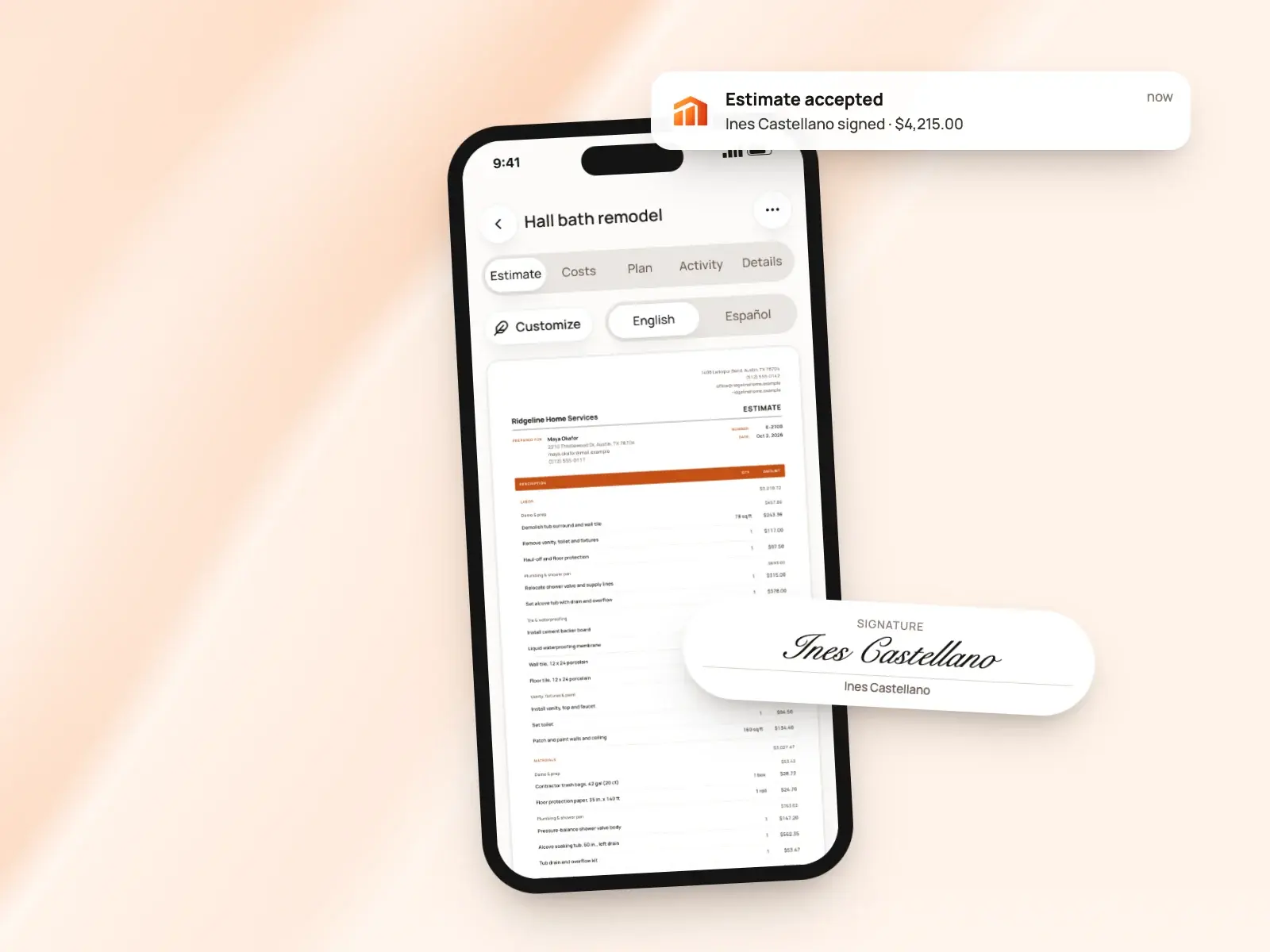
BuildWell: Clients open the estimate in any browser, with no app or account, and accept and sign with a finger or decline. Their name and signature print on the signed estimate. You can send the link by text or email, copy it, share the PDF, or collect the signature in person on your own phone. [12]
Invoices
Jobber: Jobber creates invoices in batches from the jobs you select and uses a template with your branding and contact details. It prompts you to invoice after each visit, when a job is done or on a monthly schedule. From the Connect plan up, its pricing page lists automatic card charges for recurring work. Invoices link to online payment in the client hub. [18][2][17]
BuildWell: A signed estimate becomes the invoice with the same lines, or you start one from scratch. Terms are due on receipt, 7, 14 or 30 days. You can record cash and check payments, void an unpaid invoice, ask the client to sign it, and attach job photos and renders. Clients need no account to pay. [14]
Deposits and progress payments
Jobber: Jobber’s help center says progress invoicing is on every plan. You set a payment schedule on the quote or job by percentage or fixed amount, from a single deposit to payments tied to milestones, and each invoice shows the job total next to what’s due now. A required deposit can be paid by card as the client approves the quote. [15][13]
BuildWell: Invoice any percentage of the estimate as a deposit, then progress payments, then the balance, each as its own invoice. Every payment is recorded against its invoice, so you see what’s paid and what’s left. [14]
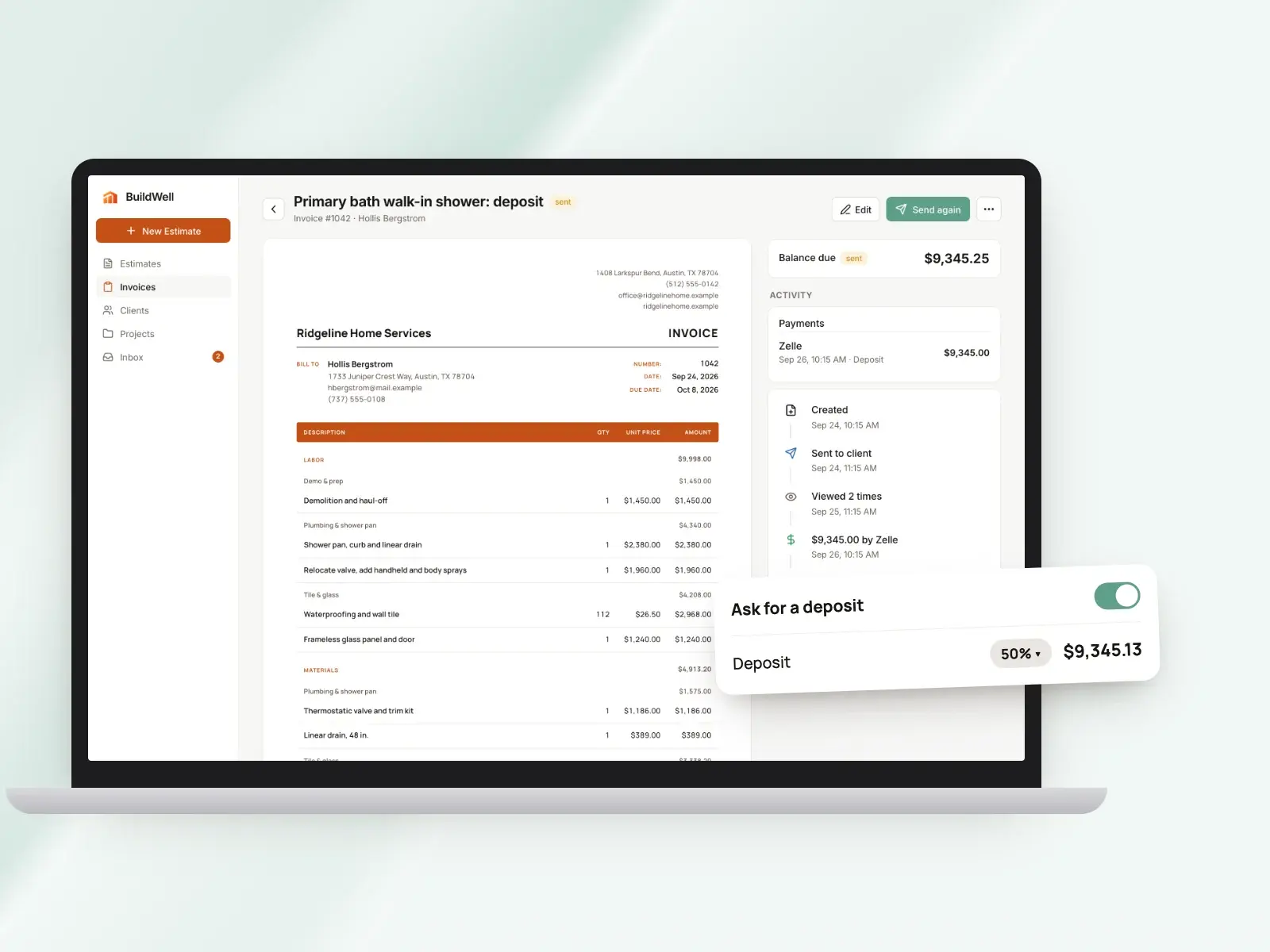
The difference: Both bill a job in stages. Jobber can collect the deposit inside the approval step; in BuildWell the deposit is its own invoice after the client signs. [13][14]
Online payments and fees
Jobber: Jobber’s help center says Jobber Payments is included with the subscription in the US, Canada and the UK. Clients pay by major credit or debit card, Apple Pay or Google Pay in the client hub, and the pricing page lists bank (ACH) payments in the US; you can also take Tap to Pay on your phone or charge a card on file. Listed rates are 2.9% + 30¢ for cards, 2.7% + 30¢ for Tap to Pay and 1% for bank payments. Payouts run on a two-business-day rolling window, and instant payouts cost an additional 1%. [17][2][19]
BuildWell: Connect Stripe and clients choose card or US bank account on the invoice page. Stripe’s fee is passed through at cost, 2.9% + 30¢ for a card and 0.8% capped at $5 for a bank transfer, with no BuildWell fee. You can also list Zelle, Venmo, Cash App, PayPal or check details to print on every invoice. [16]
The difference: Both list 2.9% + 30¢ for an online card payment. Jobber also lists in-person Tap to Pay and instant payouts; for bank transfers, Jobber lists 1% and BuildWell passes through Stripe’s 0.8%, capped at $5. [2][16]
Follow-up and reminders
Jobber: Jobber says it can follow up automatically on quotes that have gone quiet and send email or text reminders about unpaid invoices; its pricing page lists these automated quote and invoice follow-ups from the Connect plan up. Its help center says quote reminders, which put a manual follow-up on your schedule, are on every plan. Jobber says you’re notified as soon as a client acts on a quote. [9][18][2][13]
BuildWell: You see when the client opens the estimate and how many times, and get a notice when they accept, decline or pay. An estimate or invoice can be sent up to five times. [12]
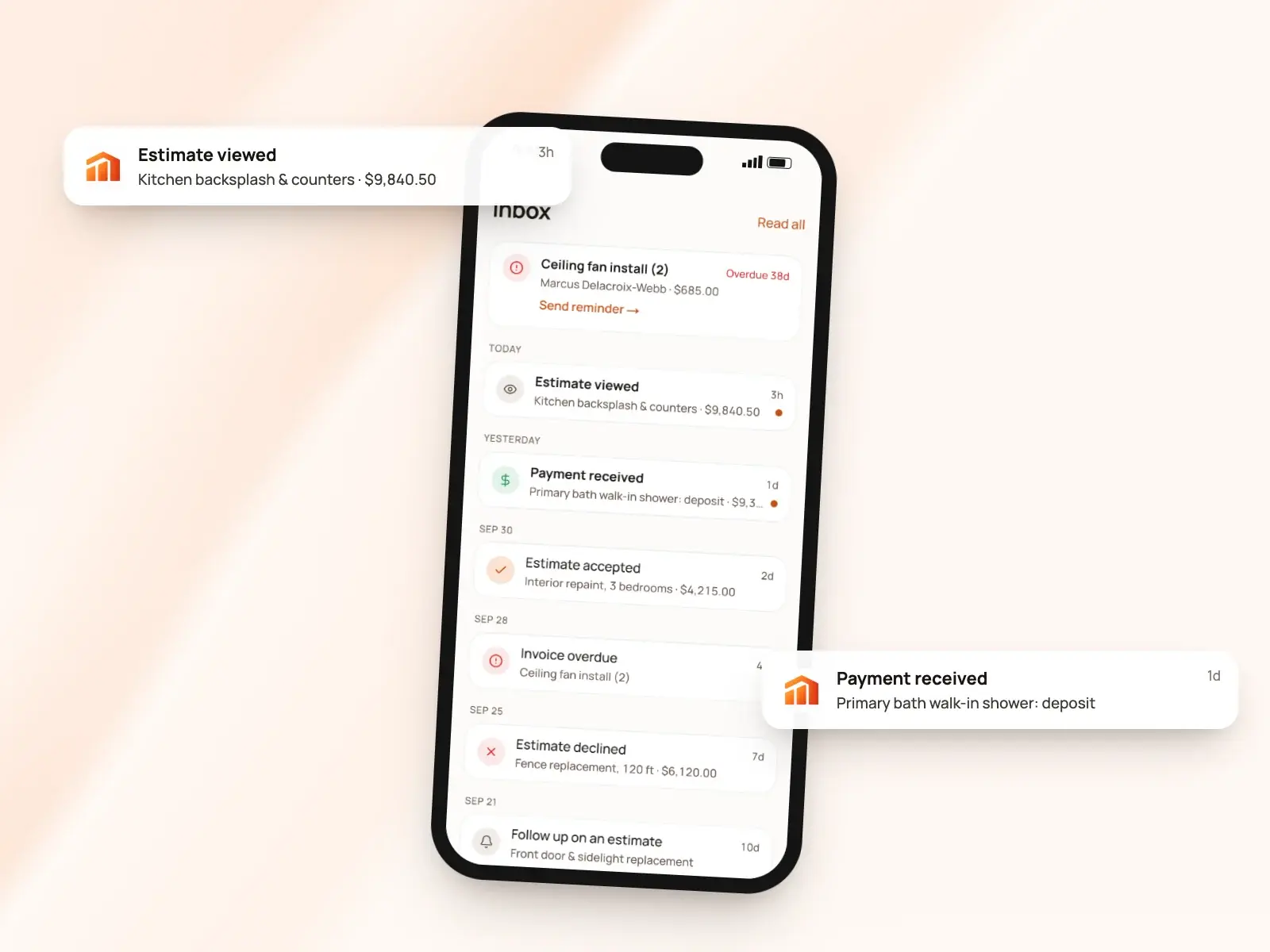
The difference: Jobber sends follow-ups for you. BuildWell tells you when the client has looked, so you decide when to call. [9][12]
Devices, language and support
Jobber: Jobber has iOS and Android apps and a web version. Its help center says Spanish switches on in the mobile app for non-admin users whose phone is set to Spanish, and any team member can choose it on the web. Live support is by phone, chat and email, Monday to Friday, 7am to 9:30pm Eastern, with Jobber AI answering chats outside those hours. The help center says Plus includes premium support and a dedicated onboarding specialist. [2][4][20][21]
BuildWell: One subscription, bought on the App Store, Google Play or the web, covers BuildWell on iPhone, Android and the web, in sync. iPhones with LiDAR can scan a room. The app works in English or Spanish and prints any estimate or invoice in either. Support is by email from the support page. [3][22]
Scheduling, CRM and accounting
Jobber: This is most of Jobber. Every plan has a client manager with job history, online booking, and a day, week and month calendar with drag-and-drop rescheduling. From the Connect plan up, its pricing page lists routing, GPS tracking, checklists, time and expense tracking, and QuickBooks Online and Xero sync; Grow and Plus add job costing, and Plus adds crew scheduling. [6][2]
BuildWell: BuildWell doesn’t do scheduling, dispatch, CRM, payroll, time tracking, GPS or accounting, and doesn’t sync with QuickBooks or Xero. Projects keep each job’s estimates, invoices, photos and renders together. [1][10]
Pricing compared
| Plan | Price | What it includes |
|---|---|---|
| Jobber Core | $49 a month with no commitment; $39 on a one-year commitment; $29 billed annually | 1 user; online booking and scheduling, quotes, invoices, online payments and the client hub [2] |
| Jobber Connect | $139 a month with no commitment; $119 on a one-year commitment; $99 billed annually | Priced for 1 user; adds automated reminders and follow-ups, automatic payments, checklists, QuickBooks Online sync, and time and expense tracking [2] |
| Jobber Grow | $199 a month with no commitment; $169 on a one-year commitment; $149 billed annually | Priced for 1 user; adds richer quotes, optional line items, markups, automatic time tracking, job costing, two-way texting and custom automations [2] |
| Jobber Plus | $499 a month with no commitment; $439 on a one-year commitment; $399 billed annually | Priced for 5 users; adds crew scheduling, custom reports, Pipeline, Marketing Suite, an AI receptionist, dedicated onboarding and premium support [2][21] |
| BuildWell Weekly | $7.99 a week | Every feature, on iPhone, Android and web [1] |
| BuildWell Annual | $79.99 a year | The same features, paid yearly [1] |
Jobber’s pricing page prices each plan by team size: the figures above are for the smallest team shown on each plan, prices rise for larger teams, and extra users are $29 a month each. The one-year commitment is billed monthly with a 12-month minimum term. Prices are in US dollars and exclude sales tax where applicable. The page also lists add-ons, each included on Plus: Marketing Suite at $99 a month, Receptionist at $29 and Pipeline at $49. BuildWell is one plan at $7.99 a week or $79.99 a year. [2][1]
Jobber’s trial is 14 days on Grow with no credit card; BuildWell’s is 3 days. Both list card fees of 2.9% + 30¢ online. For bank payments Jobber lists 1%, and BuildWell passes through Stripe’s 0.8% capped at $5. [2][1][16]
The verdict
Jobber covers a home-service business from booking to payment, with scheduling, team tools and, from its Connect plan, accounting sync. BuildWell does the estimate and the bill, and prices the work from local data. The choice depends on whether you need to manage people and visits or mainly need jobs priced. [6][2][7][1]
Choose Jobber if…
Choose Jobber if you run crews or recurring visits and want one system for bookings, the schedule, quotes, invoices and payments, with live phone, chat and email support, and routing, time tracking and QuickBooks Online or Xero sync from Connect and job costing from Grow. [6][2][20]
Choose BuildWell if…
Choose BuildWell if you’d rather describe a remodel or repair and get it priced: work and quantities planned by AI, materials at stores near the job and labor at local wages, then signed on the client’s phone, invoiced in stages and paid at Stripe’s cost, for $7.99 a week or $79.99 a year. Pair it with other tools for scheduling and accounting. [7][12][14][16][1]
Estimates priced for your ZIP
Describe the job. BuildWell lists the work, prices it from local store prices and your area’s wages, gets it signed and turns it into the invoice.
- AI estimates priced for your area
- Estimates, invoices, clients and projects
- Clients sign on any phone
- Card and bank payments, no extra BuildWell fee
- iPhone, Android and the web
- AI estimates priced for your area
- Estimates, invoices, clients and projects
- Clients sign on any phone
- Card and bank payments, no extra BuildWell fee
- iPhone, Android and the web
Both plans include every feature and start with a 3-day free trial. Add a card to start; you’re not charged until the trial ends. Cancel anytime.
Common questions
01How do BuildWell and Jobber prices compare?
02Are the payment fees different?
03Does Jobber price estimates with AI?
04Can BuildWell replace Jobber’s scheduling?
05Can clients sign and pay a deposit in both?
Sources
Facts checked on October 4, 2026. Prices and plans change; check each company’s site before you buy.
- BuildWell pricing (checked 2026-10-04)
- Jobber pricing (checked 2026-10-04)
- BuildWell estimate app (checked 2026-10-04)
- Jobber help: Spanish-language app (checked 2026-10-04)
- BuildWell estimating software (checked 2026-10-04)
- Jobber features (checked 2026-10-04)
- BuildWell AI estimates (checked 2026-10-04)
- Jobber help: products and services list (checked 2026-10-04)
- Jobber quotes (checked 2026-10-04)
- BuildWell job photos and renders (checked 2026-10-04)
- Jobber help: Jobber AI (checked 2026-10-04)
- BuildWell client portal (checked 2026-10-04)
- Jobber help: quote approvals (checked 2026-10-04)
- BuildWell invoicing (checked 2026-10-04)
- Jobber help: progress invoicing (checked 2026-10-04)
- BuildWell online payments (checked 2026-10-04)
- Jobber help: Jobber Payments basics (checked 2026-10-04)
- Jobber invoicing (checked 2026-10-04)
- Jobber payments (checked 2026-10-04)
- Jobber help: how to get help (checked 2026-10-04)
- Jobber help: the Plus plan (checked 2026-10-04)
- BuildWell support (checked 2026-10-04)
More comparisons

Try BuildWell today
Estimates, invoices, e-signatures and payments in one place, on your phone and on the web.